Why we built bill scanning
A Keells bill is never just groceries. Kiwi Money now reads every line on it and puts each item in its own category and budget.

Kavishma and I buy most of our groceries at Keells.
And every time, Kiwi Money did exactly what we built it to do. The card goes through, the bank SMS lands, and a few seconds later the purchase is in the app. Keells. Rs. 8,995. Groceries.
Done. Tracked. No typing.
For a long time that felt like enough. Then we started budgeting properly, and it stopped being enough.
A Keells bill is never just groceries
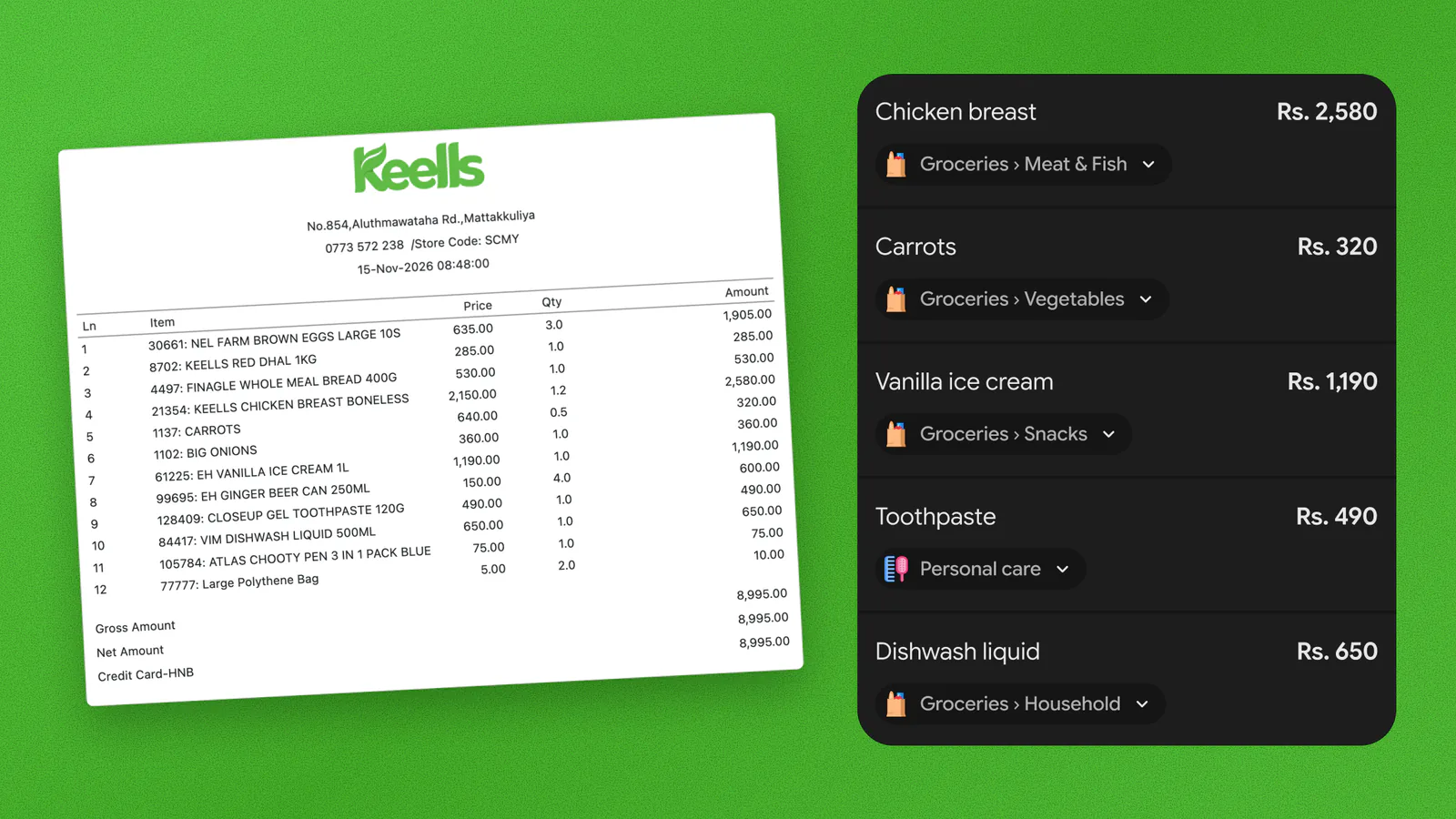
Here's what one of those bills looks like.
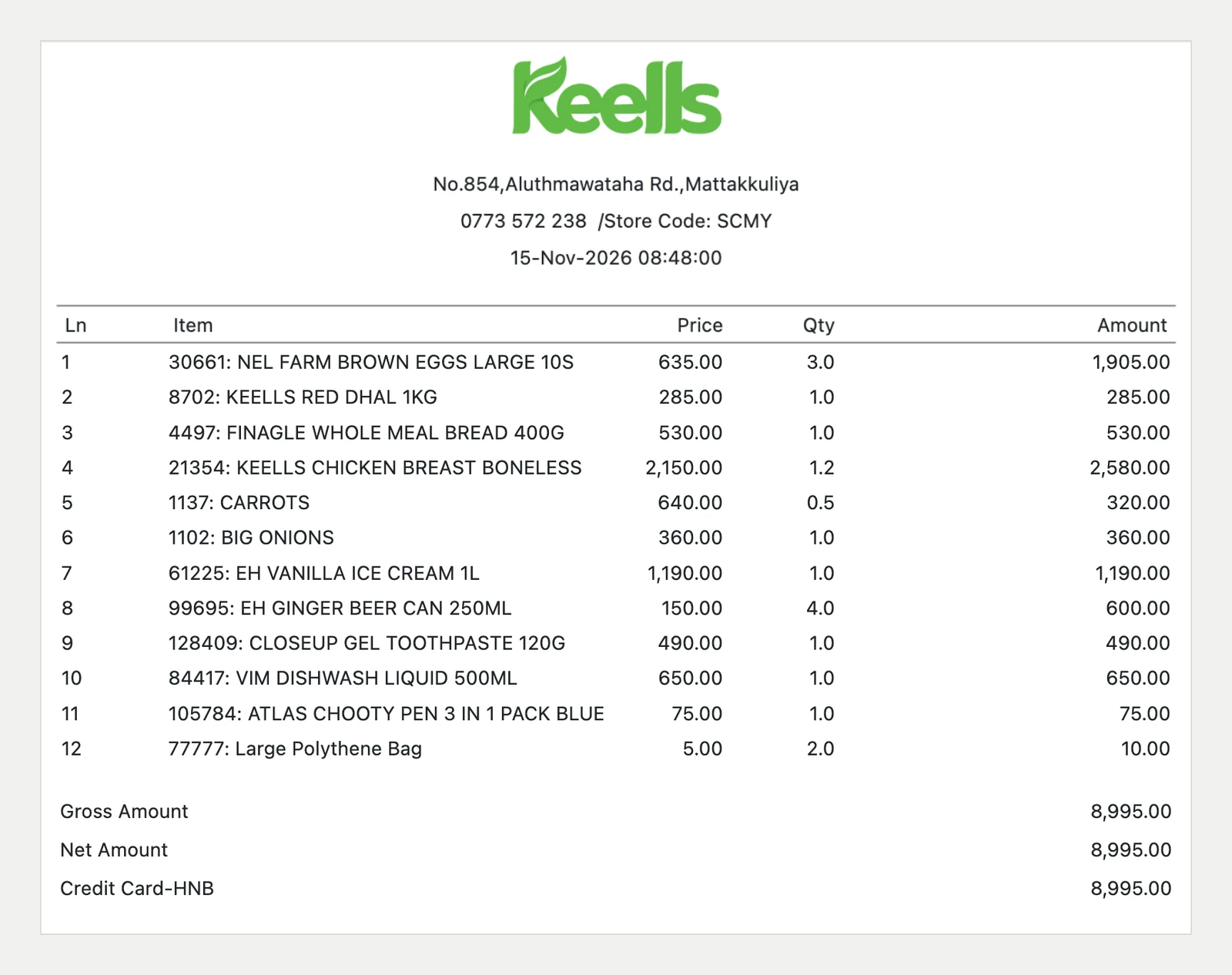
Eggs, dhal, bread, chicken, carrots, onions. Fine, that's groceries. But there's also a litre of ice cream, four cans of ginger beer, a tube of toothpaste, dishwash liquid and a pack of pens. Twelve lines, and at least five different kinds of spending.
Our bank only knows one thing: we paid Keells Rs. 8,995. So that's all Kiwi knew too. One SMS, one amount, one category.
Do that a few times a month and Groceries turns into the biggest, vaguest number in the whole app.
Where our budget fell apart
We set a monthly Groceries budget. By the third week, it was gone.
So we sat down to work out where it went. Was it the chicken? We'd started buying a lot more of it. Was it the carrots, which aren't cheap these days? Or was it the ice cream that kept sneaking into the trolley?
Kiwi couldn't tell us. Neither could we.
To answer something as simple as "did we spend Rs. 5,000 on chicken this month, or Rs. 2,000?" we had to dig out a pile of crumpled bills and add things up by hand. We kept that up for about two weeks. Then we gave up, like everyone does.
That's the problem with budgeting by category when one purchase holds five categories. You can see that you overspent. You can't see on what. And if you can't see it, you can't change it.
What we wanted was a month that read like this:
- Rs. 5,000 on chicken
- Rs. 2,000 on carrots
- Rs. 1,000 on ice cream
- and the pens, dishwash and toothpaste, which were never food at all
That's when we knew Kiwi had to look inside the bill, not just at the total.
So we built bill scanning
Bill scanning reads your bill so you don't have to.
Take a photo of the paper bill, or pick the e-bill from your photos. Kiwi reads every line, lists each item with its price, and puts each one in its own category. Chicken goes to Groceries · Meat & Fish. Carrots go to Groceries · Vegetables. Toothpaste goes to Personal care.
And because every item has its own category, every item counts toward its own budget. If you budget for Meat & Fish inside Groceries, the chicken lands there. The pens stay out of your food budget altogether.
One bill, the right categories.
How it works
- Find the purchase. If your bank SMS already brought it into Kiwi, open it and tap Scan bill. Paid in cash? Tap + and choose Scan bill, and Kiwi adds a new purchase from the bill.
- Scan the bill. Take a photo, or pick the e-bill from your gallery.
- Check the items. Kiwi lists every item with its price and the category it picked. Fix anything that looks off.
- Save. Each item goes to its own category and budget, and the photo of the bill is saved with the purchase.
It takes about a minute.
It learns how you shop
Kiwi gets most items right on the first try, but every kitchen is different. Maybe yoghurt is Dairy for you and Snacks for us. Change an item once, and the next time it shows up on a bill, Kiwi uses the category you picked.
The more bills you scan, the less you'll have to change.
The bill stays with the purchase
We used to keep bills in a drawer, just in case. Now the photo lives with the transaction. Tap Compare to see the bill right above the item list, or open the photo any time you want to check a price.
What we're still working on
This is the first version, and we'd rather be upfront about the rough edges.
- Matching bills to purchases. Scanning from the + menu adds a new purchase. If the bank SMS for that same shop is already in Kiwi, scan from inside that purchase instead so it isn't counted twice. We'd like Kiwi to find the matching purchase for you.
- Discounts on a single item. When a bill takes Rs. 50 off one item, Kiwi spreads that discount across the whole bill for now. The total is always right, but an item's price can be a few rupees off.
Budgeting, one step easier
We built Kiwi Money so you'd never have to type in a bank transaction again. Bill scanning takes that one step further. Now you don't have to type in what was inside it either.
These days, when our Groceries budget runs low, we know exactly why. It was the ice cream. It's always the ice cream.
Bill scanning is part of Kiwi Plus. Download Kiwi Money, scan your next bill, and tell us what it got wrong at [email protected].