
We reworked budgets
How we redesigned our most complex feature

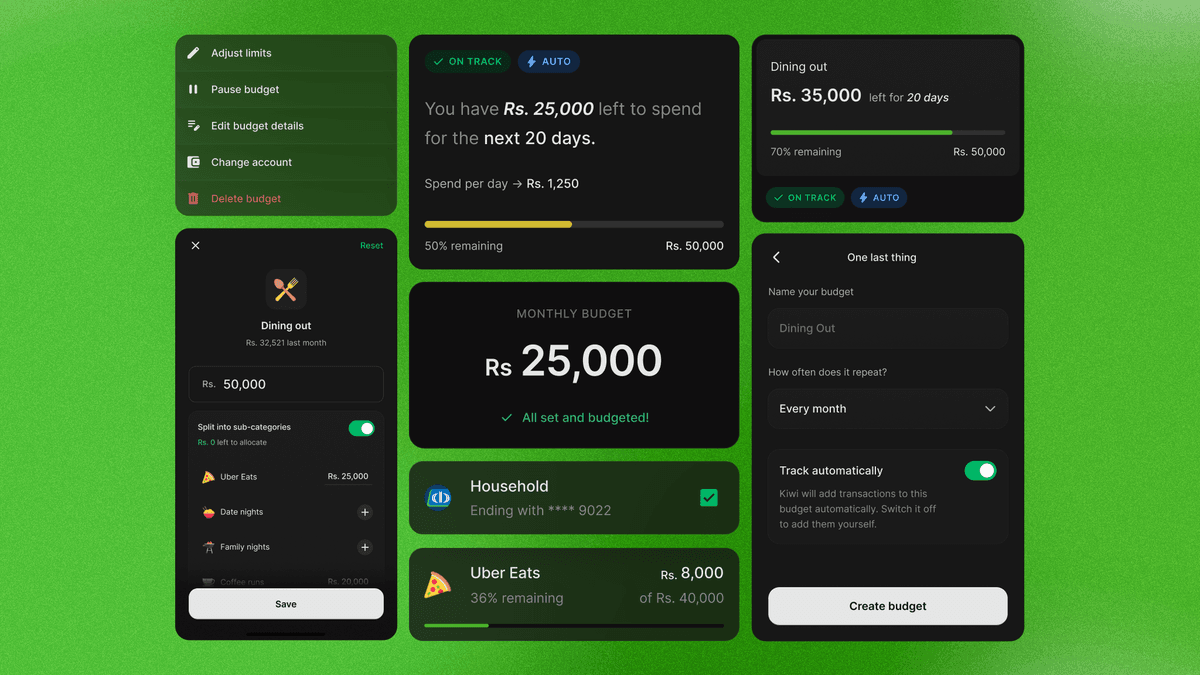
Of all the flaws and features in Kiwi Money, the one area that gave us the most trouble was Budgets. This was a feature so sophisticated that it required a special degree in finance to understand what the hell was going on.
We didn't want to be sophisticated. We wanted simplicity. But at the time, we looked at apps we thought were the benchmark for budgeting, saw they were already complex, and decided to add even more complexity on top because we wanted to handle every possible use case. The result was a feature drowning in its own ambition.
So here's how we approached the rework.
What the data told us
We designed the first version blindly. This time we had data and users to talk to.
But you know what we discovered first? That nobody f**king used budgets. 83% of our paying users never even created one. Not even once.
As a founder, you see that and think, "Not worth the effort. Move on, build something else."
But I was curious. Why weren't people using it? Too complicated? Do Sri Lankans just not budget?
Funny enough, a lot of people we spoke to were already doing a version of budgeting, just not through the budgets feature. They'd check the Insights page, see how much they spent on dining out or transport, and use that number as a mental red flag to slow down. No setup, no limits, no configuration. Just awareness.
We kept hearing some version of "Just tell me when I'm overspending." They didn't want to build a budget. They wanted the app to watch certain categories for them and nudge them if things went overboard. Like a watchlist.
What about the people who did use budgets?
Whoever took the time to sit down and understand how budgets worked in Kiwi Money, bless them, they knew exactly what they wanted. They loved the complexity.
A lot of them were creating budgets with multiple categories grouped together. Some linked multiple accounts to each budget. Most didn't even set limits for individual categories, they just tracked everything under a single monthly cap.
So we were dealing with two groups. One just wanted to not overspend on particular things like dining out and transport. The other wanted granular control over how they budgeted for their month.
The challenge became: how do we satisfy both? We could easily cater only to the majority and ignore the minority who used v1. But those people were using budgets to manage their household and livelihood. We couldn't just break that.
What we tried and abandoned
The first few designs were messy. It took a lot of mess to get somewhere good.
We tried restricting budgets to a single account. Simpler on paper, and a lot of western apps do this. But 67% of existing budgets in Kiwi were linked to multiple accounts. People here wanted specific cards and accounts tied to specific budgets. That's just how budgeting works in Sri Lanka. So we kept multi-account.
We tried allowing only single-category budgets. Clean, simple, exactly what most western apps did. But it would frustrate our power users who loved grouping categories together. Scrapped.
We tried hard restrictions. Fixed monthly frequency, mandatory amounts, fewer options. Scrapped that too. Every time we tried to restrict, we ran into someone's real use case that broke the restriction.
The pattern was clear. We didn't need fewer options. We needed better defaults with the complexity tucked away for people who want it.
What we ended up building
Budgets v2.0 works on one idea: categories are the foundation, everything else is optional.
For people who just want to keep an eye on things, pick a category, set a limit, and Kiwi tracks it. We call this Category Budgets and it's the default. A few taps and you're done.
If you think you spend too much on Dining Out or Groceries, just set a limit for each and Kiwi will tell you how you're doing.
For people who want more control, switch to Group Budgets. Take a bunch of categories, bundle them together, set a shared or individual limit. If you manage a household and want Utilities, Subscriptions and Groceries under one roof, this is how you do it. Same flexibility as v1, minus the overwhelm.
A few other things we added:
- Sub-category budgets. Want to budget for milk, bread and coffee inside Groceries? Go for it.
- Budget names are optional. We'll just use the category names.
- Monthly is the default frequency, because that's what most people were already choosing.
- Custom periods now use a calendar instead of two separate date fields.
- Pause and resume budgets. This replaces the old override feature, which was way too complicated to even explain. Trip mid-month on the same account as your monthly budget? Pause the monthly, run the trip budget, resume when you're back.
- Status labels that tell you if you're on track, going low, or over budget.
- Slide through previous months to see how you did last time compared to now.
And most importantly, creating a budget now feels progressive. No more giant form on one screen. Every step feels like you're actually making progress, and we tried to keep each one focused enough that you don't lose your mind along the way.
Why this redesign matters
Most budgeting apps we looked at weren't built for Sri Lanka. We fell in love with apps we thought were doing it right. But the conversations and data told us a different story. Different Sri Lankans budget in different ways, and no single western template covers it.
Adoption, simplicity and not breaking the way people already used the app. That's what guided this rework.
We're not gurus in this. We're learning how to build a great product, and a big part of that is watching what happens next. Do people adopt this version? Does it actually improve things? We'll find out in the coming weeks.
Let us know what you think at support@kiwi-money.com.